- EaseUS Freeware
- Free Data Recovery Software
- Free Backup Software
- Free Partition Manager
Updated on 2025-02-20
If you are unable to access the website due to DNS resolution errors, follow the steps below to address the problem.
Step-by-Step Instructions
1. Open Network Connections: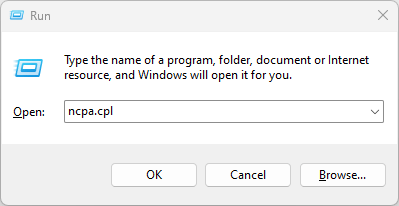
2. Choose Your Connection: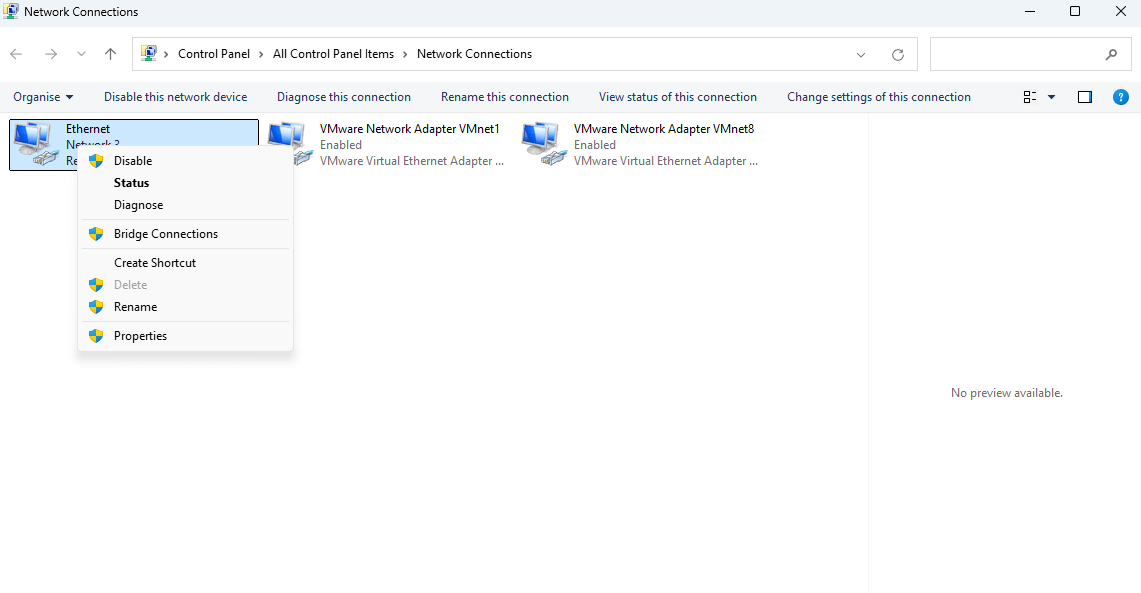
3. Update DNS Settings:
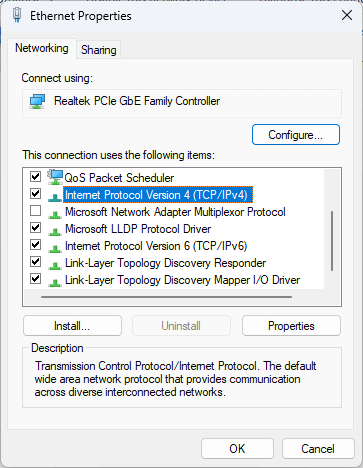
Double-click Internet Protocol Version 4 (TCP/IPv4) → Select Use the following DNS server addresses.
Enter the following parameter:
Preferred DNS: 8.8.8.8
Alternate DNS: 8.8.4.4
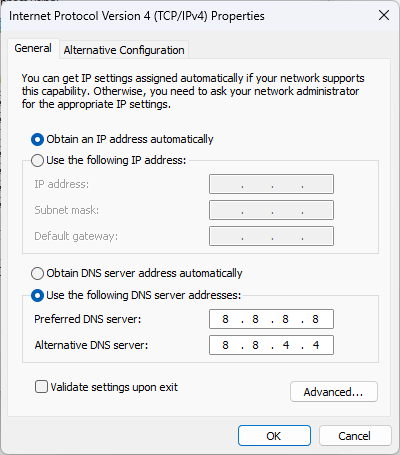
4. Save & Test:
Click OK → Close all windows → Restart your browser and try accessing the site.
FAQ
1. Is changing DNS safe?
Google DNS is a free, widely trusted service used by millions globally. It only resolves website addresses and does not collect personal data.
2. Will this slow down my internet?
Typically, no. If you notice delays, revert to automatic DNS (select Obtain DNS automatically in the same settings).
Still Stuck?
Step-by-Step Instructions
1. Open Network Connections:
- Press Windows Key + R to open Run dialog
- Type ncpa.cpl → Click OK
2. Choose Your Connection:
- Right-click your active connection (Wi-Fi/Ethernet)
- Select Properties from the menu
3. Update DNS Settings:
Double-click Internet Protocol Version 4 (TCP/IPv4) → Select Use the following DNS server addresses.
Enter the following parameter:
Preferred DNS: 8.8.8.8
Alternate DNS: 8.8.4.4
4. Save & Test:
Click OK → Close all windows → Restart your browser and try accessing the site.
FAQ
1. Is changing DNS safe?
Google DNS is a free, widely trusted service used by millions globally. It only resolves website addresses and does not collect personal data.
2. Will this slow down my internet?
Typically, no. If you notice delays, revert to automatic DNS (select Obtain DNS automatically in the same settings).
Still Stuck?
- Clear your browser cache (Chrome/Firefox: Ctrl+Shift+Del → Check Cached images and files).
- Temporarily disable firewall/security software (e.g., antivirus tools).
- Contact support for assistance:
- Email: support@easeus.com
- Live Chat: Click here
Was this article helpful?